

Neon Rain
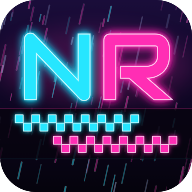

Rain falls through the neon and the checkered lights chase like a marquee.
- Scroll down
- Blink
- Fade
For Windows 10 and 11
Icon Alive turns a still app icon, logo or symbol into a smooth, looping animation for your website or app, in minutes, with no animation software to learn.
Watch the trailer See the before and after ↓
The trial has no time limit, but what it exports carries a faint watermark until you add a key.
 Made in the USA


Trailer
Before & after
Every app we make started with a still icon. These are the animations Icon Alive made from them, and they're live on each app's website. All of them ship with Icon Alive as samples, ready to open and pull apart.
Rain falls through the neon and the checkered lights chase like a marquee.


The ball appears, rolls up to the pin, waits on the lip and drops in.


The headphones bounce off the ears to the beat.


The mortar kicks back, the shell flies the dotted arc as it's drawn, and the trail clears.


Steam puffs from the chimney while the engine chugs and the headlamp glows.


A light runs slowly round the ring while its glow breathes.


The handset rattles on its cradle: brring, brring.


The carpet ripples and bobs as it flies, and the stars twinkle.


A shine sweeps across the badge and his monocle glints as it passes.


The set flips channel: a crackle of snow, color bars, snow again, and the antennas rock.


The whole bag swings from the top of its handle, like it's being carried.


Our own price tag waves in the wind, still at its hole.
What it does
Stack your own pictures, text in 14 bundled fonts or any font on your PC, and over 20,000 icons from Material Symbols, Material Design Icons, Font Awesome, Fluent UI, Tabler, Phosphor and Entypo.
No keyframes to draw. Add an effect to a layer, set how far and how fast, and it moves. Timed effects happen in part of each loop, so they stack into little stories: appear, roll, pause, drop in.
Every effect repeats a whole number of times per loop, so the end flows straight back into the start. Preview it as you go, and scrub to any moment.
Animated WebP (crisp, or lossy and up to five times smaller), GIF with smooth dithering and clean edges on any background, APNG, or a folder of PNG frames. Any size, any frame rate up to 50 a second.
Style an icon with colors, a rounded background, padding and a border, then save PNGs or JPGs at several sizes at once, a multi-size Windows .ico, or copy it straight to the clipboard.
Animations save as one file with their pictures inside, so they still open if the originals move. Your last animation is waiting when you come back, unsaved changes and all.
How it works

Questions
No. There's no AI in it anywhere: it doesn't generate pictures, guess what you want, or take prompts. You choose the effects and set the sliders, and it does exactly that, the same way every time. It runs on your PC and doesn't upload your pictures or animations anywhere.
No. You do the animating, with a lot of help: you put the parts of your icon on layers, give each one an effect (a spin, a bounce, a shine...), and Icon Alive plays it, loops it and exports it. It doesn't look at a picture and decide what should move. The ready-made samples, one for each of our apps, open up so you can see how they were built and start from one.
No, not by itself. An .ico is a still picture, and Icon Alive won't animate it on its own. You can add it as an image layer and give it effects, so the whole icon spins or pulses, and the animation comes out as WebP, GIF or APNG, because an .ico file can't hold animation. Icon Alive can also save still icons as .ico, at several sizes in one file.
No. There are no keyframes or timelines to learn. You add a layer, pick an effect from a list, and set how far and how fast it goes. Every effect loops cleanly, so what you preview is what you export.
Your own pictures (PNG, JPEG, GIF, WebP, ICO and other common image files), text in 14 bundled fonts or any font on your PC, and over 20,000 icons from seven bundled icon sets. A picture with a transparent background works best. If a picture's parts don't touch, Separate objects turns each one into its own layer so they can move independently.
No. Icon Alive reads the image types Windows can open, and SVG isn't one of them. Export your SVG as a PNG with a transparent background first, and use that.
Animated WebP, GIF, APNG, or a folder of PNG frames, at any size up to 1024 pixels and up to 50 frames a second. WebP is the one to use on websites: small, smooth, with transparency, and every current browser plays it. GIF is for places that only take GIF, such as some email and chat tools. It doesn't make video files, but the PNG frames drop straight into a video editor.
Yes. What you make from your own pictures and text is yours. The icon sets built into the app are open-licensed; the app's Third-party notices (in its settings menu) list each one and any credit it asks for.
Windows 10 and 11. There's no Mac or web version.
Yes. Get it from the Microsoft Store and it installs the same app, with the same trial. A key from this site removes the watermark in either copy.
Icon Alive has a trial: download it and use all of it for as long as you like, but everything it exports carries a faint diagonal ICON ALIVE watermark. A product key removes the watermark: $1.99 once, for one PC, with no subscription. Buy a key.
Ask us. A person reads every message.

Download the trial for Windows 10 and 11: it watermarks what you export. A key removes the watermark: $1.99 once, no subscription.
New to Icon Alive? The guide covers your first animation, every setting, and what to do if something goes wrong.
Made in the USA