Getting started
Installing. Download the installer from the download page, run it and follow the steps. It needs Windows 10 or 11 (64-bit).
Your first hand. The first time you play, Jack walks you through one hand. A ring pulses around the button to use next, and a small tag beside it shows its key and what to say. Do what it shows and the guide moves on: bet, deal, hold, draw. Press Esc or the ✕ on the tag to skip it; Help › Show me how to play brings it back any time.

The free trial. The free version is the whole game for 10 hands a day, all four games together, on each PC. The last five hands of the day are counted down in Jack's message after the deal, and tomorrow brings 10 more.
Unlocking the full game. A product key ($1.99, once) makes the hands unlimited on one PC. Buy one in our shop, then in the game go to Settings › Full game › Enter product key, paste the key and press Activate. The PC needs to be online for that, once. When the day's free hands run out, the same window opens by itself.
A new PC? Enter the key on the new PC and the game moves with it; the old PC goes back to the free trial. Lost your key? Have it emailed again.
From the Microsoft Store? The Store's copy has the same free trial, and is bought in the Store, not with a key: go to Settings › Full game › Buy the full game (or play until the day's free hands run out) and the Store's own purchase window opens. The Store keeps it up to date.
Sound. Jack talks and the soundtrack plays quietly from the start. Set them in Settings › Sound & Voice: Effects volume for Jack and the sound effects, Music and its volume for the soundtrack. The toolbar's speaker and music buttons turn them off and on.
How to play
It plays like a casino's video poker machine, with play credits only: no real money is ever bet or won.
A hand, step by step
- Bet 1 to 5 credits: BET 1 adds one, BET 2 to BET 5 set the bet, BET MAX bets 5. CLEAR BET gives it back. The payout table at the top right shows what each hand pays for each bet; a royal flush pays 4,000 on a 5-credit bet.
- DEAL five cards.
- Hold the cards you want to keep: click a card (or its HOLD button) to hold it, click again to let it go.
- DRAW new cards in place of the rest. A banner over the cards names the hand, and a win is added to your credits at once. Big hands ring bells and throw brass gears across the table.
Your name, credits and bet are in the strip above the bet buttons. If you don't have enough credits for the bet, Jack says so; reset the player or switch to another one.
A daily allowance. Once a day, the first time a player sits down, Jack adds 50 credits.
The games
Choose one in Settings › Game. Each choice shows the long-run return of perfect play, so you know how generous it is.
- Jacks or Better: a pair of jacks or better wins. Six pay tables, from the generous 9/6 (99.54%) down to 6/5 (95.00%).
- Bonus Poker: Jacks or Better that pays extra for four aces, and for four 2s, 3s or 4s.
- Double Double Bonus: bigger still for those fours, and the most with the right fifth card: four aces with a 2, 3 or 4 pays 2,000 on a max bet. Two pair pays only even money.
- Deuces Wild: every 2 is wild. You need three of a kind to win, and there are new hands: five of a kind, the wild royal flush and four deuces.
Jack's advice
After the deal, press HINT (or ask What should I hold?
) and Jack outlines the cards
that pay best on average. He works it out exactly, for the game and pay table you're playing, by checking every
possible draw. Hold for me
(or A) holds them for you.
Turn on the strategy trainer and, after each draw, Jack tells you when another hold would have paid more: he says so, and his bubble shows the cards he'd have held and how much more they pay on average.
Say Help
or Jack
at any point and he tells you what to do next.
Need a laugh? Say Tell me a joke
(or Another joke
) and Jack tells one of his
poker and steampunk jokes. He gets through them all before he repeats one, and he laughs at every one of them.
Double up
After a win, DOUBLE UP appears. Jack turns up a card and you pick one of the four face down
(click it, press 2 to 5, or say Card two
…). Higher than Jack's doubles the win, the
same rank keeps it, lower loses it. Aces are high, and Jack has something to say whichever way it goes. You can double up to five times in a row; Collect
(C), or just betting again, keeps your winnings.
Players and statistics
Up to ten people can keep their own credits, history and achievements. Open Players & Statistics from the toolbar on the right.
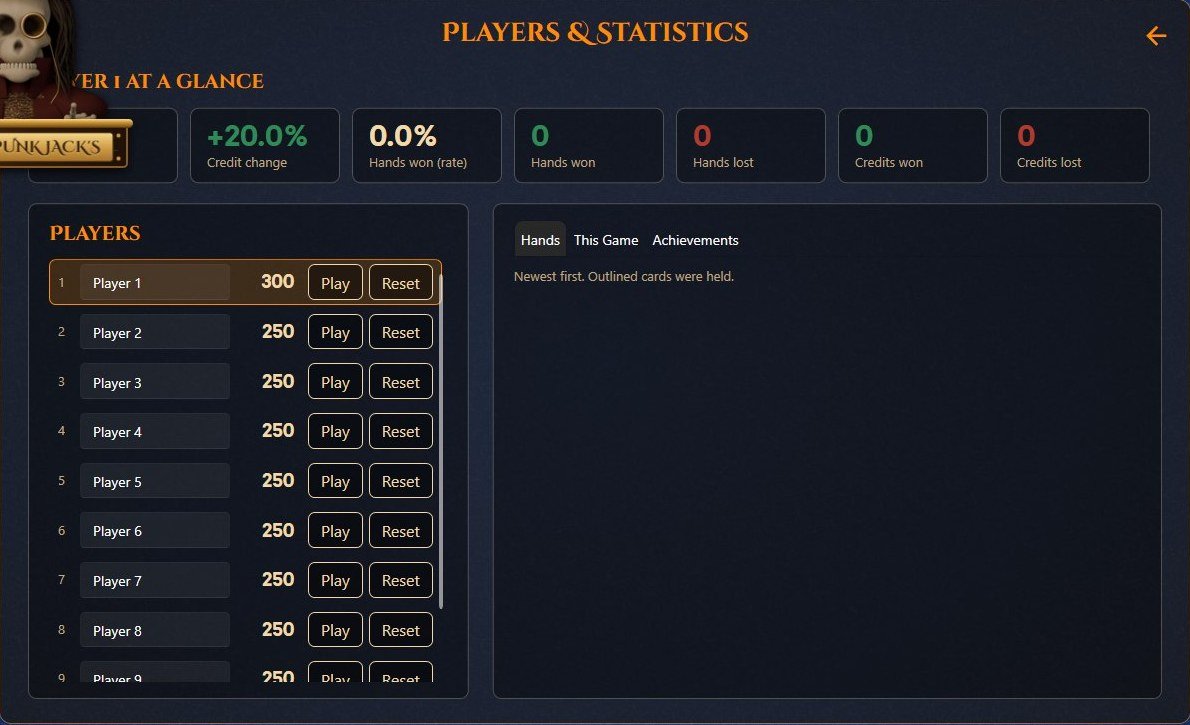
- Rename a player by typing in their name box.
- Play switches to that player.
- Reset clears the player's credits, history and achievements, after asking, and starts them again with the credits set in Credits after a player reset.
The tabs on the right show the current player's Hands (newest first; outlined cards were held), This Game (your return against the pay table's perfect-play return, how often you played like Jack, and how often each hand has come up) and thirteen Achievements, from Beginner's Luck to a natural royal flush. Jack announces each one as you unlock it.
Backgrounds
Pick the scene behind the table from the toolbar's Backgrounds button. Each player keeps their own.
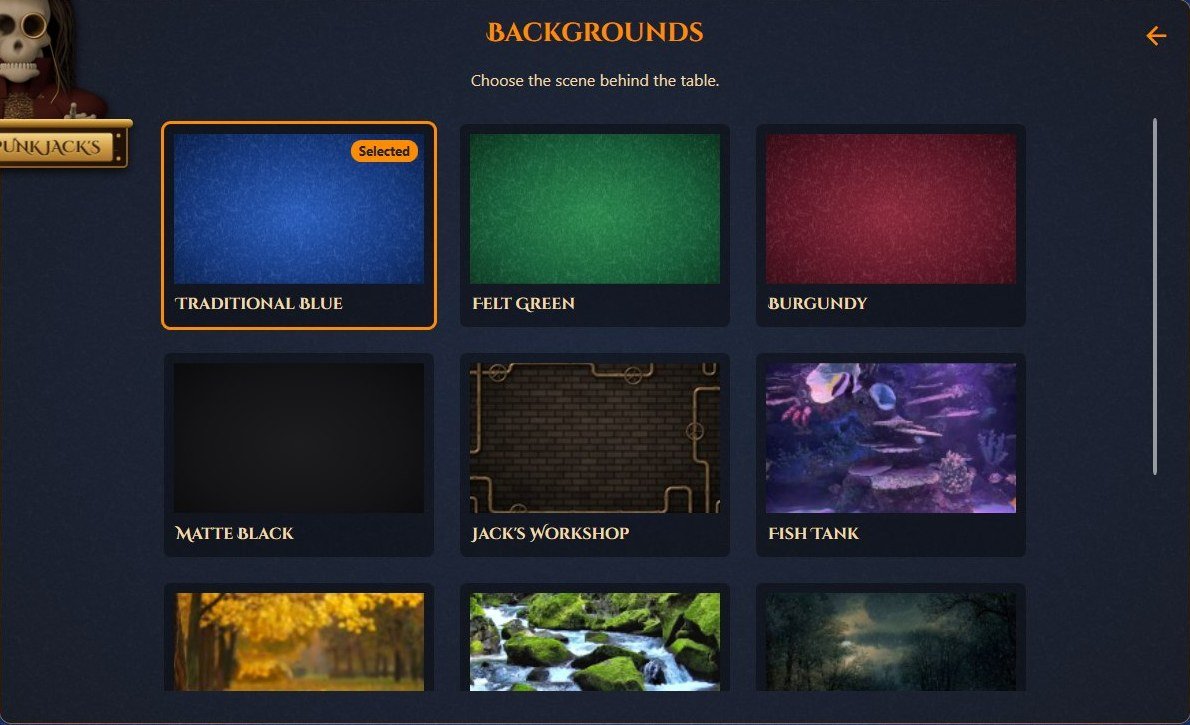
Traditional Blue, Felt Green, Burgundy, Matte Black and Jack's Workshop are part of the game. Fish Tank, Fall Leaves, Mossy Stone Waterfall, Moonlit River Snowfall and Money Roll are moving videos: each is downloaded the first time you choose it, so that needs an internet connection once.
Playing by voice
Turn the microphone on with the microphone button in the toolbar on the right (it's on at startup unless you change that in Settings), then say a command. Everything can also be clicked or played from the keyboard. The commands are in English and use Windows' own speech recognition, which runs on your PC; nothing you say is recorded.
| To | Say |
|---|---|
| Bet | Bet one… Bet five, Bet max, Clear bet |
| Play | Deal, Draw |
| Hold cards | Hold card one… Hold card five, any rank ( Hold aces, Hold sevens), any suit ( Hold hearts) or one card ( Hold ace of spades). Say Cancelinstead of Holdto let cards go ( Cancel card two). |
| Ask Jack | What should I hold?, Hint, Hold for me, Help, Jack, Tell me a joke |
| Double up | Double up, then Card two… Card five; Collect |
| Sound | Sound on, Sound off, Music on, Music off, Microphone off |
| Pages | Open Settings, Open Help, Open Statistics, Open Backgrounds, Open About; Backor Closeto return to the table |
| Window | Minimize window, Maximize window |
Every command also works after his name: Jack, deal
. Away from the table (on Settings, Help and the
other pages) Jack only listens for Back
.
A noisy room? In Settings › Sound & Voice › Jack listens, choose to have
him act only on commands said after Jack
, or only while you hold Ctrl. The game listens through
Windows' echo cancellation, so the music and Jack's own voice aren't taken for you.
Test your microphone on the Help page: say a command and it shows what Jack heard, without playing it. The full list of phrases Jack understands is there too.
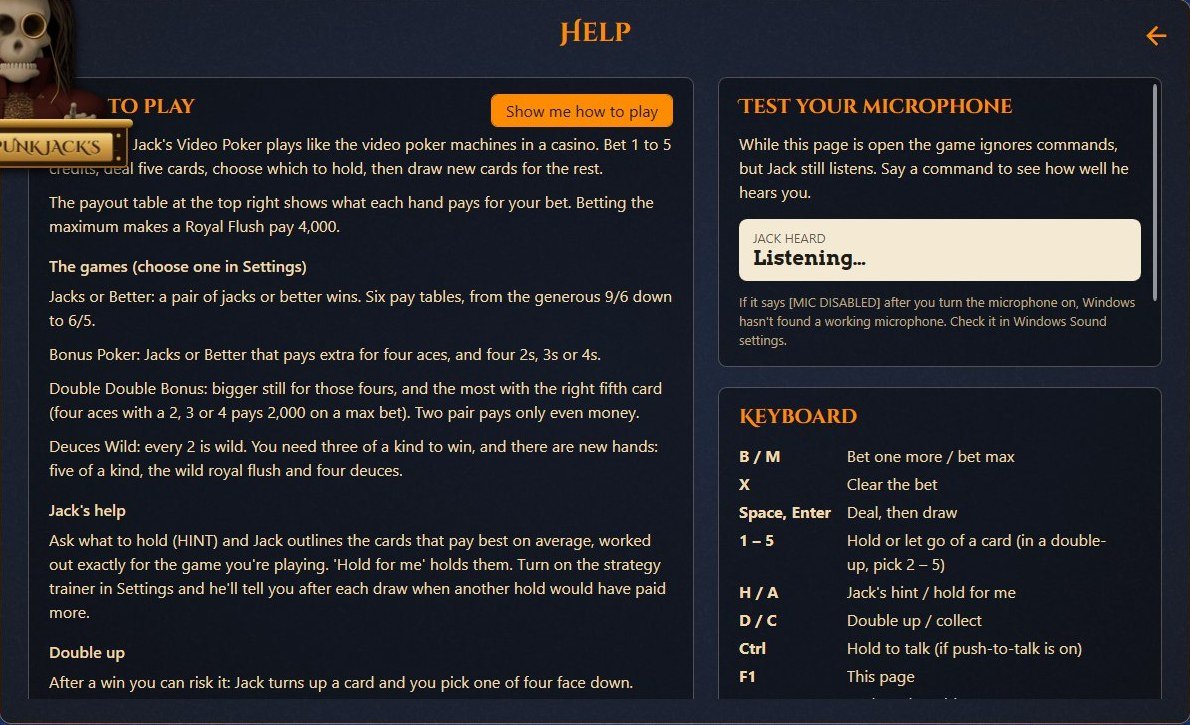
Keys and buttons
| Key | At the table |
|---|---|
| B / M | Bet one more / bet max |
| X | Clear the bet |
| Space, Enter | Deal, then draw |
| 1 – 5 | Hold or let go of a card (in a double-up, pick 2 – 5) |
| H / A | Jack's hint / hold for me |
| D / C | Double up / collect |
| Ctrl | Hold to talk (when Jack listens only while Ctrl is held) |
| F1 | Help |
| Esc | Back to the table from any page; skips the first-hand guide |
| Tab | Move between buttons; Space presses one (away from the table) |
The toolbar on the right, from the top: Settings, Players and statistics, Backgrounds, About and Help; then the microphone, sound effects and music on/off. Under it is the game's version, which turns into Update available when there's a newer one. Every page has a back arrow at its top right.
Settings
Open Settings with the gear at the top of the toolbar. Changes take effect at once and are kept. Default marks what a new install starts with.
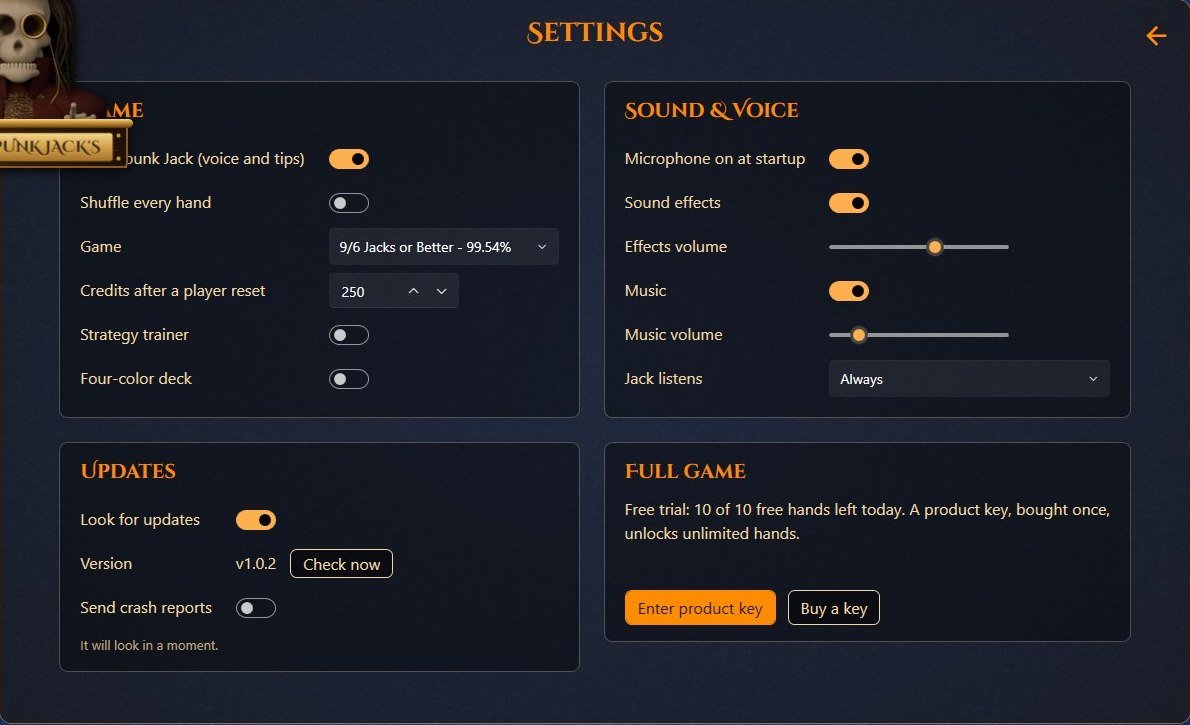
Game
| Steampunk Jack (voice and tips) | On Default / Off. Off, Jack's speech bubble and voice go quiet. |
| Shuffle every hand | Off Default / On. Off, hands are dealt on through the same deck and it's shuffled when it runs low; on, every deal starts from a freshly shuffled deck, as a casino machine does. |
| Game | The game and pay table: 9/6 Jacks or Better - 99.54% Default, 9/5 Jacks or Better - 98.45%, 8/6 Jacks or Better - 98.39%, 8/5 Jacks or Better - 97.30%, 7/5 Jacks or Better - 96.15%, 6/5 Jacks or Better - 95.00%, 8/5 Bonus Poker - 99.17%, 9/6 Double Double Bonus - 98.98%, Full Pay Deuces Wild - 100.76%. The percentage is the long-run return with perfect play. |
| Credits after a player reset | 250 Default (1 to 1,000). What a new player starts with, and what Reset sets a player's credits back to. |
| Strategy trainer | Off Default / On. After each draw, Jack says when holding other cards would have paid more on average. |
| Four-color deck | Off Default / On. Diamonds blue and clubs green, so every suit has its own color. |
Sound & Voice
| Microphone on at startup | On Default / Off. Whether Jack starts listening as soon as the game opens. The microphone button in the toolbar turns it on and off any time. |
| Sound effects | On Default / Off. Jack's voice and the game's sounds (cards, bets, wins). Same as the toolbar's speaker button. |
| Effects volume | A little over halfway Default. The volume of Jack's voice and the sound effects. |
| Music | On Default / Off. The game's music-hall soundtrack. Same as the toolbar's music button. |
| Music volume | Low Default, so it stays under Jack. The soundtrack's volume. |
| Jack listens | Always Default; Only after "Jack" ("Jack, deal"); Only while Ctrl is held. The last two stop talk in the room from setting things off. |
Updates
| Look for updates | On Default / Off. A few seconds after the game starts, and every six hours, it asks our website for the newest version number and, if there's a newer one, shows Update available under the toolbar. It never downloads or installs anything by itself. |
| Version | The version you have. Check now looks straight away. |
| Send crash reports | Off Default / On. On, if the game runs into a problem it sends us the details without asking first. Off, it asks each time. Ticking Always send reports automatically in a crash report turns this on. See what a report holds. |
Full game
Shown while you're on the free trial: how many free hands are left today, Enter product key and Buy a key ($1.99), which opens the shop in your browser. Once a key is activated it says the full game is unlocked. In the copy from the Microsoft Store there's one button instead, Buy the full game, which opens the Store's purchase window.
Troubleshooting and FAQ
Jack doesn't hear me
Make sure the microphone button in the toolbar is on, then open Help and use Test your
microphone. If it says [MIC DISABLED], Windows hasn't found a working microphone:
check it in Windows' Settings › System › Sound. If Jack listens is set to
Only after "Jack"
or Only while Ctrl is held
, he ignores anything else. Speak the commands as
written; Windows' speech recognition for US English works best.
Jack does things I didn't ask for
Something in the room sounded like a command. Set Settings › Sound & Voice › Jack listens
to Only after "Jack"
or Only while Ctrl is held
, or turn the microphone off and play with the
mouse or keyboard.
There's no sound
Check Settings › Sound & Voice: Sound effects on and Effects volume up for Jack and the effects; Music on and Music volume up for the soundtrack. Then check Windows' own volume, and that the right speakers or headphones are chosen.
Windows protected your PC
The installer is signed, but Windows SmartScreen can still warn about a new download it hasn't seen often. Choose More info, then Run anyway. The download page says more, and how to check your download is the one we published.
My key won't activate
The PC needs to be online to activate, once. Check the key was pasted in full. The activation window says what went wrong; if the shop couldn't be reached, try again in a few minutes. A key works on one PC at a time: activating it on a new PC moves it there. Still stuck? Contact us with your purchase email (never post the key itself).
A background won't load
The moving backgrounds are downloaded the first time you choose them, so the PC needs to be online then. The table plays on without it; choose it again later, or pick one of the built-in backgrounds.
Where are my players and settings?
Everything the game keeps is in %LocalAppData%\VideoVoicePoker (paste that into File Explorer's
address bar): your players and their hands in Players, your settings, the downloaded background
videos in Videos, and the game's log in Logs. Nothing is kept online.
Moving to a new PC
Install the game on the new PC, then copy the Players folder from
%LocalAppData%\VideoVoicePoker on the old PC into the same place on the new one, before you play
there. If you have a key, enter it on the new PC (Settings › Full game › Enter product key).
Uninstalling
Use Windows' Settings › Apps › Installed apps, find Steampunk Jack's Video Poker and choose
Uninstall. Your players and settings are left in %LocalAppData%\VideoVoicePoker so a
reinstall carries on where you were; delete that folder to remove everything.
Sending logs to support
Open Help and, under Something not working?, choose Send logs to support. Add a note about what happened (and your email if you'd like a reply); you'll see exactly what's sent first. Open log folder shows the log files themselves.
Is real money involved?
No. The game is played with play credits only: nothing is bet or won for real, and credits can't be bought. If a player runs low, the daily allowance tops them up, or Reset starts them again.
Still stuck?
Ask us through the contact page and we'll help.